Page 9 of 10
Re: Newbie Problem - impossible to enter numbers in the sub-tracks (Chance, velocity,...)
Posted: 12 Feb 2026 18:57
by kjetil
elode wrote: ↑06 Feb 2026 15:59
Well... it seems that the keyboard shortcuts (Ctrl+s, alt+y, ctrl+z,...) do not work, and this regardless of the layout (QWERTY, BÉPO, FR).
Could it be that editor didn't have keyboard focus when you tried the keybindings?
Re: Newbie Problem - impossible to enter numbers in the sub-tracks (Chance, velocity,...)
Posted: 12 Feb 2026 20:26
by elode
No, I checked again today. The keyboard shortcuts don’t work even when the editor have keyboard focus.
Re: Newbie Problem - impossible to enter numbers in the sub-tracks (Chance, velocity,...)
Posted: 14 Feb 2026 09:28
by kjetil
Does any keyboard shortcut work?
Can you check in Help -> Edit keybindings that you haven't set custom keybindings for the ones that don't work?
Also, when I try to run debug version of Radium in Plasma+wayland, hardly anything works, neither keyboard nor mouse, something is screwed up in the event handling before I get any events into Radium. Plasma+X11 does work fine though. The binaries also work in Plasma+wayland, so maybe it's on my end. But X11 might be a way to run Radium, if it's possible.
Re: Newbie Problem - impossible to enter numbers in the sub-tracks (Chance, velocity,...)
Posted: 14 Feb 2026 09:46
by kjetil
Also, can you test "Help -> Debugging -> Test error message" to ensure error messages are shown? Sounds like keyboard isn't initialized correctly and then an error message should be shown.
Re: Newbie Problem - impossible to enter numbers in the sub-tracks (Chance, velocity,...)
Posted: 14 Feb 2026 15:05
by elode
Help > Edit Keybinding:
There is only one keyboard shorcut defined: F1 EXTRA_L EDITOR : ra.markRange
---
Help > Program debugging > Test error message:
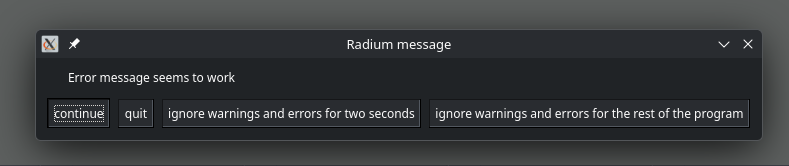
- Copie d'écran_20260214_160238.png (23.22 KiB) Viewed 63 times
Re: Newbie Problem - impossible to enter numbers in the sub-tracks (Chance, velocity,...)
Posted: 14 Feb 2026 15:21
by elode
I did some tests: The problems seem quite similar with Wayland or X11.
Re: Newbie Problem - impossible to enter numbers in the sub-tracks (Chance, velocity,...)
Posted: 14 Feb 2026 16:38
by kjetil
I don't know. I have to think about what it could be. I'm releasing a new version now. It shouldn't be much different from the last version you tried, but it doesn't hurt trying.
Re: Newbie Problem - impossible to enter numbers in the sub-tracks (Chance, velocity,...)
Posted: 14 Feb 2026 17:56
by elode
Ok…
Re: Newbie Problem - impossible to enter numbers in the sub-tracks (Chance, velocity,...)
Posted: 15 Feb 2026 09:04
by elode
Still on the test version you sent me, curiously, some keyboard shortcuts work.
By using the left-hand Alt and Ctrl keys, the following shortcuts work in QWERTY:
- Alt or Ctrl+6
- Ctrl + 7
- Alt + F
It seems to me that with these modifiers, no other shortcut works.
I did not try with the Alt and Ctrl Right keys.
On the other hand, could I have the new version in order to do some tests. I am a subscriber and I did not understand how to obtain the new versions.
Sincerely,
Re: Newbie Problem - impossible to enter numbers in the sub-tracks (Chance, velocity,...)
Posted: 15 Feb 2026 09:22
by kjetil
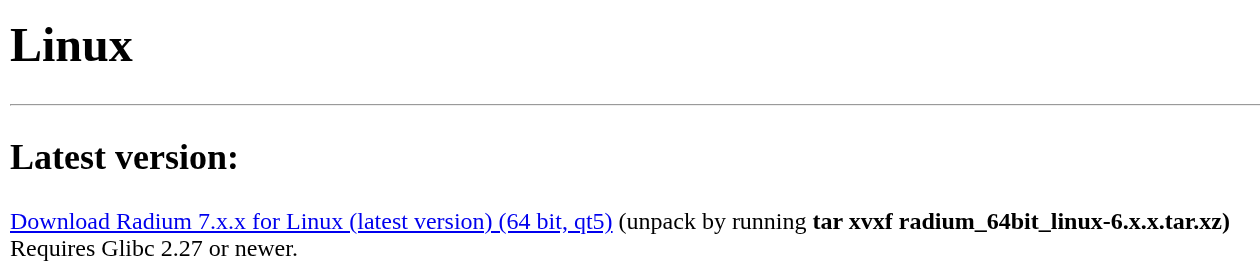
Go to the web page you got when subscribing, then download from this link:
- Untitled.png (25.9 KiB) Viewed 51 times